
Two conventions, not one mistake
Short answer: 1 KB is 1000 bytes because that is what the SI standard says, and 1 KiB is 1024 bytes because that is what the IEC standard says. Both are correct. Neither one overwrote the other, which is why both are still in use fifty years later.
It matters more than it looks. The gap between 1000 and 1024 is 2.4 percent per step, and because each prefix is applied three times in a terabyte, the total gap is about 9.7 percent. That is the difference between a drive you paid for and the number your computer shows.
Where each one came from
The 1000 comes from the SI system. It was designed in 1960 as a coherent, decimal system, because decimal arithmetic is what people had and what trade and science ran on. A kilo is a thousand, a mega is a million, a giga is a thousand million. The prefixes are pure powers of ten, so multiplying and dividing by them is just moving the decimal point.
- 1 TB as sold = 1,000,000,000,000 bytes
- 1 GiB = 1,073,741,824 bytes
- 1,000,000,000,000 ÷ 1,073,741,824 = 931.32 GiB
The 1024 comes from binary arithmetic, where it is 2¹⁰ and therefore the closest round number above 1000. In 1998 the IEC standardised the binary prefixes with the letter i in the middle: KiB, MiB, GiB, TiB. The letter was the whole point. It made visible what had been ambiguous, and it lets both systems coexist in the same word without anyone being wrong.
Where the 1024 originally came from, and why it stuck
The number 1024 predates both standards. Early computers built their memory from chips that came in sizes that were powers of two, because binary is what the hardware does. A machine with 1,024 bytes of memory was a nice round amount of chips. That made 1024 feel like the natural unit for anything a computer measured, and by the time anyone wrote down a standard, 1024 was already the thing everybody used for file sizes.
The trouble is that 1024 has nothing to do with bits or bytes. A byte is 8 bits and 8 is a power of two, so there is a pleasing story about why storage would be in 1024s. It is still wrong. 1 KB is 1000 bytes, and that is 8000 bits, and 8000 is not a power of two. The reasoning that feels natural and the arithmetic that is true do not line up, which is why this question comes back every few years.
Why your 1 TB drive shows as 931 GB
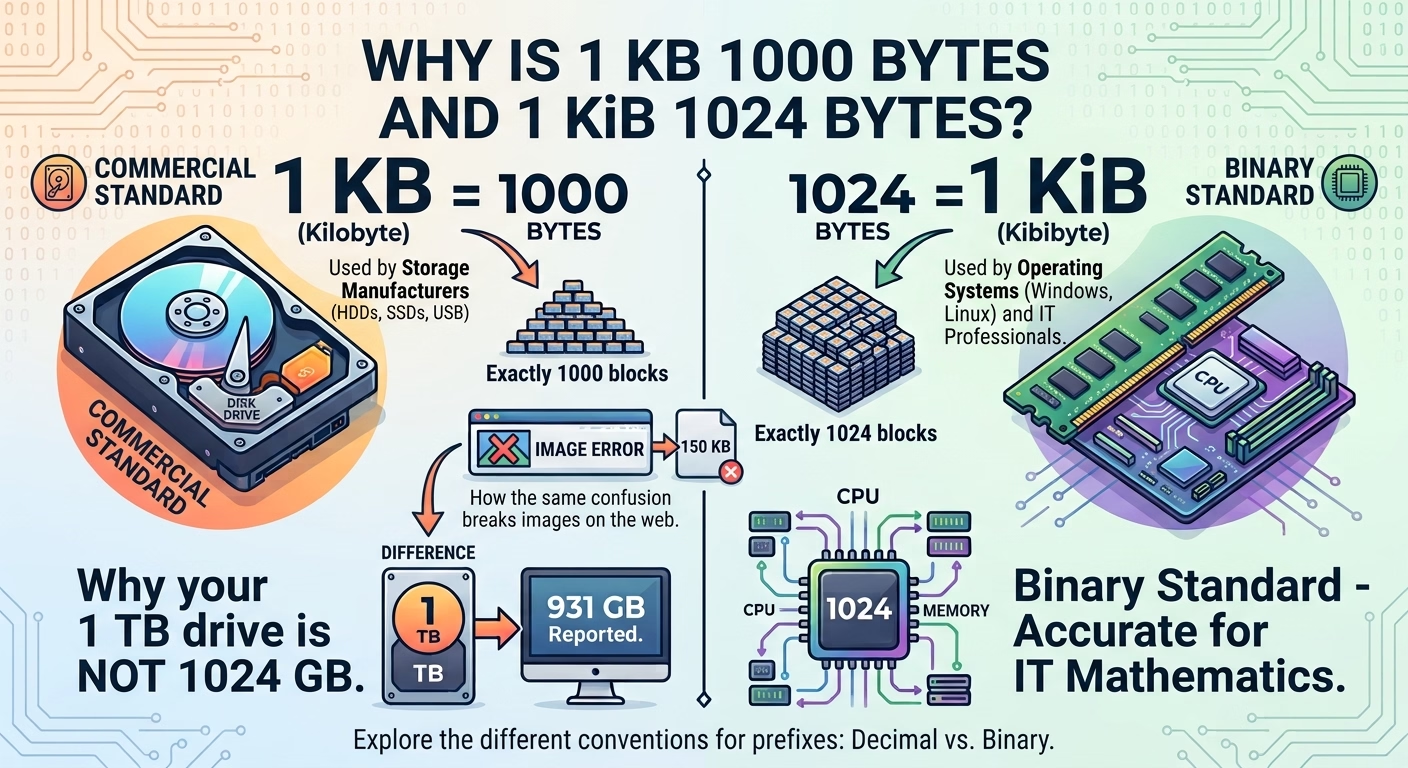
This is the practical part, and it is pure arithmetic. The box says 1 TB, which the manufacturer counts as 1,000,000,000,000 bytes. Your operating system divides by 1,073,741,824 to display gibibytes, so it reports 931.
- 1 TB as sold = 1,000,000,000,000 bytes
- 1 GiB = 1,073,741,824 bytes
- 1,000,000,000,000 ÷ 1,073,741,824 = 931.32 GiB
Nothing is broken and nothing is missing. The manufacturer used the SI prefix, the operating system used the IEC prefix, and 931 is the honest answer to "how many gibibytes is a terabyte". The reason this reads as a scam is that both numbers are called TB on the box and in the menu, and the only place the difference is visible is that one of them is 9.7 percent smaller than the other.
The same confusion breaks images on the web
The bug is everywhere, and it is always the same bug. A server sends a file size of 500 KB, which means 500,000 bytes. The page multiplies by 1024 because that is what you do with file sizes, gets 512,000, and every image loads 2.4 percent too large. It is small enough that nobody notices on a fast connection and large enough that the layout drifts on a slow one.
The fix is not to change the multiplier, it is to stop guessing. If you are multiplying a byte count, use 1000. If you are allocating memory or counting powers of two, use 1024. Which one applies depends on what the number originally meant, and nobody knows that from the number alone.
What to say when someone asks
The short version: KB is 1000 and KiB is 1024, both are official standards, and a KB is 2.4 percent smaller than a KiB. The longer version is the history above, and it explains why a hard drive never shows the capacity printed on it.
If you need to check a number rather than explain one, a unit converter will do both sides side by side. The Ufumbuzi unit converter carries KB, MB and GB on base 1000 and KiB, MiB and GiB on base 1024 as separate units, so converting between them shows the gap instead of hiding it. It also covers speed, cooking measures, pressure and energy, which is where the other common mismatches happen.
Useful recommendations
Ufumbuzi runs on one of these. We are not paid to list the rest.
If you ever want to build something of your own, this is where we host Ufumbuzi. Hostinger offers shared hosting, domains and email at prices lower than most providers, and there is a discount waiting on the link.
Disclosure: Some links on this page are referral links. If you make a purchase through them, we may earn a small commission at no extra cost to you, while you get a special discount. We only recommend services that add real value.