

A Robust Solution for Exporting Data to Excel
In enterprise application development, the need to export data from Oracle databases to versatile
formats such as Microsoft Excel is a common task. While there are traditional methods, such as
generating files directly in the server operating system, a powerful and flexible alternative is to
generate the file contents directly in PL/SQL and deliver them as a BLOB (Binary Large Object) data
type. In this article, we will explore the creation of an Oracle PL/SQL package,
Pkg_Sylk, designed to generate the contents of a Symbolic Link (SLK) file from a SELECT
query and return it as a BLOB.
Why generate SLK content as BLOB from Oracle PL/SQL?
- Flexibility in Delivery: Returning content as a BLOB offers great flexibility in how the file is delivered to the end user. The BLOB can be downloaded through a web application, stored in a table for further processing, sent as an email attachment, or transmitted through various channels.
- File Server Independence: This strategy eliminates the need to write files to the Oracle server's file system, simplifying permissions management, increasing security, and avoiding concurrency issues.
- Integration with Applications: Facilitates integration with modern applications that can efficiently consume and process BLOBs, such as web applications developed in Oracle APEX, Java, Python, etc.
What is an SLK file?
The SLK format is a text file format used for data exchange between spreadsheet applications, primarily Microsoft Excel. It is a simple, character-based format that organizes data into rows and columns.
Creating our PL/SQL Package: Pkg_Sylk
The Pkg_Sylk package encapsulates the logic for generating SLK content as a BLOB. Below,
we'll break down its key components:
- Custom Data Types: The package defines custom data types to improve code
clarity and organization:
Cursor_Ref_Typeis a reference cursor type used to process dynamic query results.Array_Typeis an integer-indexedVARCHAR2table, which acts as an array to store the data for each row in the query.Array_Type_Column_Typeis anotherVARCHAR2table that stores the data types of each column ('A' for alphanumeric, 'N' for numeric, 'F' for date).
- F_Clob_To_Blob Function: This function converts a CLOB (Character Large Object)
to a BLOB. This is an important utility because SLK content is initially constructed as text and
then converted to a BLOB type for delivery. Use
DBMS_LOB.Createtemporaryto create a temporary BLOB. Read the CLOB in chunks usingDBMS_LOB.Readand write the chunks to the BLOB usingDBMS_LOB.Write. Handle theNO_DATA_FOUNDexception to terminate the read loop. - Fun_Generate_Slk Function: This is the main function that generates the SLK
content and returns it as a BLOB.
- Declares local variables and cursors:
V_Slk_File (CLOB): Stores the contents of the SLK file while it is being built.Cur_Process: Cursor that retrieves the SQL query (Query_Export) from theTquerytable based on the providedProcess_Id.Cur_Columns: Cursor that retrieves column information (name, data type) from theTcolumnstable for the givenProcess_Id.V_Ref_Cursor: Dynamic reference cursor that is opened to execute the SQL query retrieved from theTquerytable.
- Builds the SLK file header: Initializes the
V_Slk_Filevariable with the initial lines required by the SLK format. - Generate column headers: Iterate through the
Cur_Columnscursor to obtain the column names.- Constructs the SLK lines that define the column headers ('F;SDM5;Y1;X', 'C;Y1;X', etc.).
- Stores the column data types in the
V_Data_Typearray.
- Executes the query and processes the results: Opens the dynamic
reference cursor
V_Ref_Cursorto execute the SQL query.- Traces the query results row by row. For each row, it iterates through the columns and generates the SLK lines corresponding to the data, taking into account the data type of each column (alphanumeric, numeric, or date).
- Uses the
P_Add_Linefunction to add lines to the CLOBV_Slk_File, handling the maximum line length.
- Finalizes the SLK file and converts it to a BLOB:
- Adds the final line 'E' to the SLK file. Call the
F_Clob_To_Blobfunction to convert theV_Slk_FileCLOB to a BLOB. - Return the resulting BLOB.
- Adds the final line 'E' to the SLK file. Call the
- Exception Handling: Include an
EXCEPTIONblock to catch any errors during processing and raise a custom exception withRaise_Application_Error.
- Declares local variables and cursors:
Example of Use
To use the package, you first need to have the configuration tables (Tquery,
Tcolumns) populated. The example script provides these tables and sample data:
- tProducts: Sample table with product data.
- Tquery: Table that stores the SQL queries to be executed.
- tColumns: Table that defines the columns to be included in the SLK file and their data types.
Then, you can call the Pkg_Sylk.Fun_Generate_Slk function to obtain the BLOB:
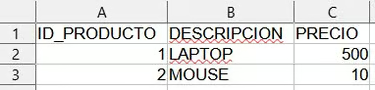
SELECT Pkg_Sylk.Fun_Generate_Slk(1, 'Productos.slk') FROM DUAL;This will execute the query stored in Tquery with Process_Id = 1, generate
the SLK content, and return it as a BLOB. Opening the BLOB displays the file as follows:
How to consume BLOB SLK?
The BLOB returned by the Fun_Generate_Slk function can be consumed in several ways,
depending on your needs:
- Download via a web application (Oracle APEX, etc.): The application can
retrieve the BLOB and configure it as a file download, setting the appropriate MIME type
(
application/x-slkorapplication/octet-stream). - Save to an Oracle table: The BLOB can be stored in a BLOB column in a table for later processing, auditing, or deferred downloading.
- Additional processing in PL/SQL: Although less common, the BLOB can be manipulated within PL/SQL if necessary (e.g., to compress it before storing it).
- Attach it to an email: If you have a process that sends emails, you can have a parameter to send an attachment and use the output from this packet.
Advantages of this Solution (with focus on BLOB)
- Versatile Delivery: Delivering the SLK file as a BLOB allows for great flexibility in how users or applications consume the data.
- Enhanced Security: By avoiding direct writes to the server's file system, security risks and permission issues are reduced.
- Simplified Integration: The nature of the BLOB facilitates integration with web applications and other platforms that can efficiently handle binary data.
- Logic Centralization: The PL/SQL package encapsulates all SLK file generation logic, facilitating code maintenance and reuse.
Additional Considerations
- Performance: For large volumes of data, BLOB generation can consume significant memory and CPU resources. It is important to optimize SQL queries and consider paging data if necessary.
- Error Handling: The package includes error handling, but it is crucial to implement appropriate error handling in the application consuming the BLOB to ensure system robustness.
- Character Encoding: Ensuring the correct character encoding is essential to avoid problems when opening the SLK file in Excel. The provided package appears to handle this implicitly, but attention should be paid to the data encoding in the database.
- SLK Format Limitations: The SLK format has some limitations compared to more modern formats such as XLSX. Consider whether SLK fully meets your formatting and data complexity needs.
- Query Parameters: If you want the query to have parameters, you can enhance the
process to allow this functionality. You can add parameters to the query using a convention like
@@param1@@and replace them with the desired values at runtime, before processing the query. - Column limit: This example has a limit of 25 columns for the resulting file, but you can adapt it to your needs.
Conclusion
Exporting data to Excel doesn't have to depend on rigid file server permissions or complex operating
system architectures. The Pkg_Sylk package demonstrates that by leveraging Oracle
PL/SQL's native capabilities, we can centralize our business logic and deliver files in a highly
flexible format like BLOB.
While the SLK format has its limitations regarding advanced styling, its simplicity and lightweight nature—combined with the security and versatility of database-level generation—make this approach an outstanding, robust solution for modern enterprise environments. Feel free to take this script, adapt the column limits, implement runtime parameters, and integrate it into your own applications.
The Pkg_Sylk package script is provided below.
--Product table as input for sample data
CREATE TABLE tProducts (
Product_id NUMBER NOT NULL,
Description VARCHAR2 (100) NOT NULL,
Price NUMBER NOT NULL,
CONSTRAINT Pk_tProducts PRIMARY KEY (Product_id)
);

INSERT INTO tProducts (Product_id, Description, Price)
VALUES (1, 'LAPTOP', '500');

INSERT INTO tProducts (Product_id, Description, Price)
VALUES (2, 'MOUSE', '10');

COMMIT;

--Table containing the SELECT of the data to generate the SLK file
CREATE TABLE Tquery (
Process_Id NUMBER NOT NULL,
Description VARCHAR2 (200) NOT NULL,
Query_Export VARCHAR2 (4000),
CONSTRAINT Pk_Tquery PRIMARY KEY (Process_Id)
);

INSERT INTO Tquery (Process_Id, Description, Query_Export)
VALUES (1, 'PRODUCTS', 'SELECT Product_id, Description, Price FROM tProducts');

COMMIT;

--Configuration table of the columns to be downloaded in the SLK
CREATE TABLE tColumns (
Process_Id NUMBER NOT NULL,
Column_id NUMBER (4) NOT NULL,
Column VARCHAR2 (50) NOT NULL,
Data_Type VARCHAR2 (1) DEFAULT 'A' NOT NULL, --A=Alfanumeric, N=Numeric, F=Date
CONSTRAINT Pk_tColumns PRIMARY KEY (Process_Id, Column_id),
CONSTRAINT Fk_tColumns_Tquery FOREIGN KEY (Process_Id) REFERENCES Tquery (Process_Id)
);

INSERT INTO tColumns (Process_Id, Column_id, Column, Data_Type)
VALUES (1, 1, 'Product_id', 'N');

INSERT INTO tColumns (Process_Id, Column_id, Column, Data_Type)
VALUES (1, 2, 'Description', 'A');

INSERT INTO tColumns (Process_Id, Column_id, Column, Data_Type)
VALUES (1, 3, 'Price', 'N');

COMMIT;

--Specifying the package to generate SLK files
CREATE OR REPLACE PACKAGE Pkg_Sylk IS
TYPE Ref_type_Cursor IS REF CURSOR;

TYPE Array_Type IS TABLE OF VARCHAR2 (2000)
INDEX BY PLS_INTEGER;

TYPE Array_Type_Tipo_Column IS TABLE OF VARCHAR2 (1)
INDEX BY PLS_INTEGER;

--Function that converts text to binary
FUNCTION F_Clob_To_Blob (P_Clob IN CLOB)
RETURN BLOB;

--Function that generates the SLK file
FUNCTION Fun_Generate_Slk (P_Process_Id Tquery.Process_Id%TYPE, P_File_Name VARCHAR2)
RETURN BLOB;
END Pkg_Sylk;
/

CREATE OR REPLACE PACKAGE BODY Pkg_Sylk IS
FUNCTION F_Clob_To_Blob (P_Clob IN CLOB)
RETURN BLOB IS
--Function that converts text to binary
V_Blob BLOB;
V_Offset NUMBER DEFAULT 1;
V_Amount NUMBER DEFAULT 4096;
V_Offsetwrite NUMBER DEFAULT 1;
V_Amountwrite NUMBER;
V_Buffer VARCHAR2 (4096 CHAR);
BEGIN
DBMS_LOB.Createtemporary (V_Blob, TRUE);

BEGIN
LOOP
DBMS_LOB.Read (Lob_Loc => P_Clob, Amount => V_Amount, Offset => V_Offset, Buffer => V_Buffer);
V_Amountwrite := UTL_RAW.LENGTH (R => UTL_RAW.Cast_To_Raw (C => V_Buffer));
DBMS_LOB.Write (Lob_Loc => V_Blob, Amount => V_Amountwrite, Offset => V_Offsetwrite, Buffer => UTL_RAW.Cast_To_Raw (V_Buffer));
V_Offsetwrite := V_Offsetwrite + V_Amountwrite;
V_Offset := V_Offset + V_Amount;
V_Amount := 4096;
END LOOP;
EXCEPTION
WHEN NO_DATA_FOUND THEN
NULL;
END;

RETURN V_Blob;
END F_Clob_To_Blob;

FUNCTION Fun_Generate_Slk (P_Process_Id Tquery.Process_Id%TYPE, P_File_Name VARCHAR2) RETURN BLOB IS
--Function that generates the SLK file
TYPE Ref_type_Cursor IS REF CURSOR;

V_File_Slk CLOB;
V_Slk_Buf VARCHAR2 (32767);

V_Cant_Columns NUMBER := 0;

CURSOR Cur_Proceso (P_Process_Id Tquery.Process_Id%TYPE) IS
SELECT Query_Export
FROM Tquery
WHERE Process_Id = P_Process_Id;
V_Select Tquery.Query_Export%TYPE;
--
v_sentence VARCHAR2 (5000);
V_Ref_Cursor Ref_type_Cursor;
v_array Array_Type;
V_Data_Type Array_Type_Tipo_Column;
V_Col_Ini NUMBER (4);

CURSOR Cur_Columns IS
SELECT Column_id, Column, Data_Type
FROM tColumns
WHERE Process_Id = P_Process_Id
ORDER BY Column_id;

--
V_Fila NUMBER (10) := 1;
V_message VARCHAR2 (500);
J NUMBER (4);
C_Max_Columns CONSTANT NUMBER (2) := 25;
V_Label VARCHAR2 (4000);

V_Blob_Result BLOB;

--

PROCEDURE Pr_Add_Line (P_line VARCHAR2) IS
BEGIN
   IF LENGTH (V_Slk_Buf) + LENGTH (P_line) <= 32760 THEN
      V_Slk_Buf := V_Slk_Buf || P_line || CHR (10);
   ELSE
      V_File_Slk := V_File_Slk || V_Slk_Buf;
      V_Slk_Buf := P_line || CHR (10);
   END IF;
END Pr_Add_Line;

BEGIN
V_message := 'Searching for query text';
OPEN Cur_Proceso (P_Process_Id);
FETCH Cur_Proceso INTO V_Select;
CLOSE Cur_Proceso;

V_message := 'Open SLK';

V_File_Slk :=
'ID;PWXL;N;E'
|| CHR (10)
|| 'P;P#,##0.00'
|| CHR (10)
|| 'P;Pdd/mm/yyyy;;@'
|| CHR (10)
|| 'P;FArial;M200'
|| CHR (10)
|| 'P;FArial;M200'
|| CHR (10)
|| 'P;FArial;M200'
|| CHR (10)
|| 'P;FArial;M200'
|| CHR (10)
|| 'P;EArial;M200;SB'
|| CHR (10)
|| 'O;L;D;V0;K47;G100 0.001'
|| CHR (10);

V_message := 'Writing headings';

--Encabezados
FOR C IN Cur_Columns LOOP
V_Cant_Columns := V_Cant_Columns + 1;
V_Label := C.Column;
V_File_Slk :=
V_File_Slk
|| 'F;SDM5;Y1;X'
|| V_Cant_Columns
|| CHR (10)
|| 'C;Y1;X'
|| V_Cant_Columns
|| ';K"'
|| V_Label
|| '"'
|| CHR (10);
V_Data_Type (V_Cant_Columns) := C.Data_Type;
END LOOP;

--Defines the maximum number of columns
IF V_Cant_Columns > 25 THEN
Raise_Application_Error (-20001, 'Maximum 25 columns allowed');
END IF;

V_message := 'Editing the query';
v_sentence := 'SELECT' || RPAD (' ', (C_Max_Columns - V_Cant_Columns) * 5 + 1, 'NULL,') || SUBSTR (LTRIM (V_Select), 8);

V_message := 'Opening the cursor';

OPEN V_Ref_Cursor FOR v_sentence;

V_message := 'Processing records';

LOOP
V_message := 'Filling the array';

FETCH V_Ref_Cursor
INTO v_array (1), v_array (2), v_array (3), v_array (4), v_array (5),
v_array (6), v_array (7), v_array (8), v_array (9), v_array (10),
v_array (11), v_array (12), v_array (13), v_array (14), v_array (15),
v_array (16), v_array (17), v_array (18), v_array (19), v_array (20),
v_array (21), v_array (22), v_array (23), v_array (24), v_array (25);

EXIT WHEN V_Ref_Cursor%NOTFOUND;

V_Fila := V_Fila + 1;
J := 0;
V_Col_Ini := C_Max_Columns - V_Cant_Columns + 1;

V_message := 'Inserting columns';

FOR I IN V_Col_Ini .. C_Max_Columns LOOP
J := J + 1;
IF V_Data_Type (J) = 'A' THEN
Pr_Add_Line ('C;Y' || V_Fila || ';X' || J || ';K"'
|| REPLACE (v_array (I), ';', ',') || '"');
ELSIF V_Data_Type (J) = 'N' THEN
Pr_Add_Line ('C;Y' || V_Fila || ';X' || J || ';K'
|| REPLACE (v_array (I), ',', '.'));
ELSIF V_Data_Type (J) = 'F' THEN
Pr_Add_Line ('F;P1;Y' || V_Fila || ';X' || J || CHR (10)
|| 'C;Y' || V_Fila || ';X' || J || ';K'
|| REPLACE (TO_CHAR (TO_DATE (v_array (I), 'DD/MM/YYYY HH24:MI:SS') - TO_DATE ('01011900', 'DDMMYYYY') + 2), ',', '.'));
END IF;
END LOOP;
END LOOP;

CLOSE V_Ref_Cursor;

V_File_Slk := V_File_Slk || V_Slk_Buf || 'E' || CHR (10);
V_Blob_Result := F_Clob_To_Blob (V_File_Slk);

RETURN (V_Blob_Result);

EXCEPTION
WHEN OTHERS THEN
Raise_Application_Error (-20002, 'Error: ' || V_message || '. ' || SQLERRM);
END Fun_Generate_Slk;
END Pkg_Sylk;
/

--Checking the result
SELECT Pkg_Sylk.Fun_Generate_Slk (1, 'Productos.slk') FROM DUAL;
Useful recommendations
Ufumbuzi runs on one of these. We are not paid to list the rest.
If you ever want to build something of your own, this is where we host Ufumbuzi. Hostinger offers shared hosting, domains and email at prices lower than most providers, and there is a discount waiting on the link.
Disclosure: Some links on this page are referral links. If you make a purchase through them, we may earn a small commission at no extra cost to you, while you get a special discount. We only recommend services that add real value.