

Your free personal RSS reader. Organize and read your favorite news and blogs all in one place. The RSS reader lets you follow and read content from different…
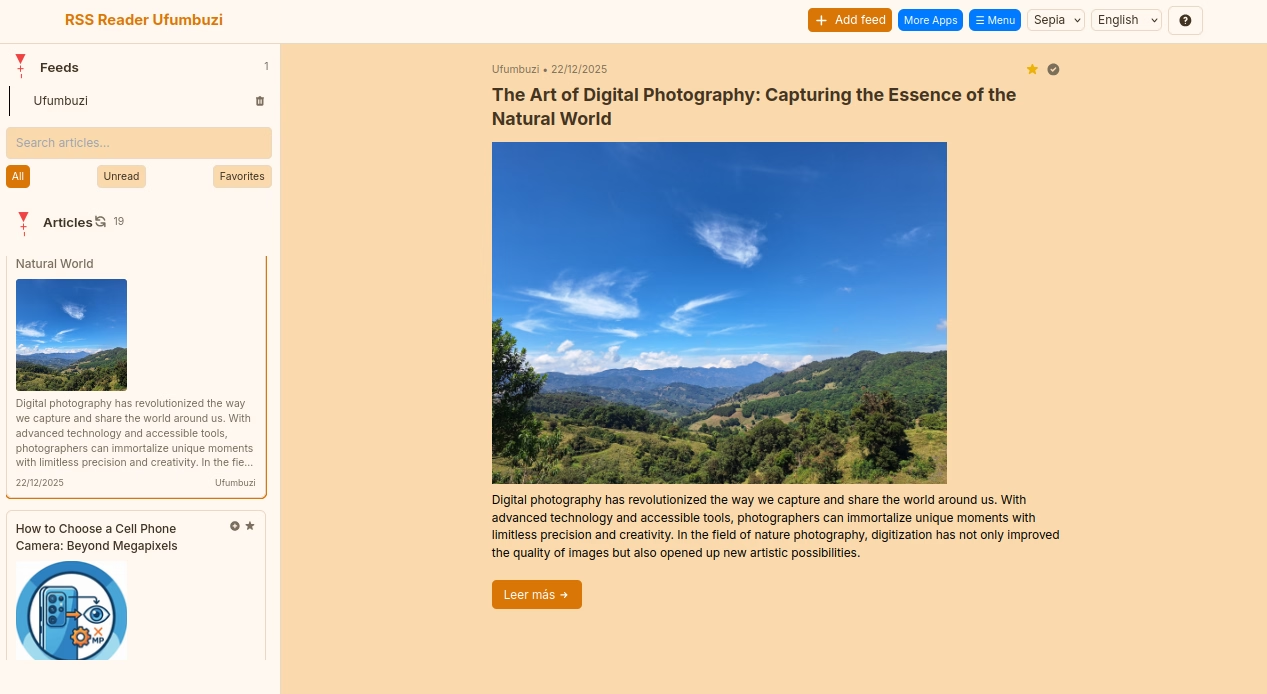
Find this application for Linux (.deb) at 👉 Linux Downloads
The RSS reader is a powerful tool for those who want to stay informed and up-to-date with their favorite content in an organized, efficient, and uninterrupted way. This tool is designed to transform your digital information consumption, giving you back control over what you read.
This application addresses several common problems in current information consumption:
The Ufumbuzi RSS Reader serves as your personalized 'digital magazine'. Its main features include:
There are significant technical and practical reasons to choose this application:
An RSS reader (also known as a news aggregator or feed reader) is an application or web service that allows you to subscribe to content sources from different websites and receive updates in one place, in an organized manner.
To understand it better, let's first look at what an RSS feed is.
What is an RSS Feed?
An RSS feed (short for Really Simple Syndication or Rich Site Summary) is an XML file that contains information about the latest updates from a website, such as blog articles, news, podcasts, etc. Think of it as a 'channel' that a website offers so that other programs or services can automatically read its most recent content.
Every time a website publishes new content, its RSS feed is updated. This file usually includes the title, a summary of the content, and a direct link to the original publication. You can recognize an RSS feed by a small orange icon or by the terms 'RSS' or 'XML.'
What is an RSS Reader Used For?
An RSS reader primarily serves to:
Stay updated effortlessly: Instead of having to manually visit each of your favorite websites to see if there's new content, the RSS reader does it for you. It automatically collects the latest publications from all the feeds you've subscribed to and presents them to you in one place.
Save time: By consolidating all information in one place, you avoid information overload and can quickly scan headlines to decide which content you want to read in depth.
Customize your news flow: You have complete control over which sources you follow. You can choose exactly the blogs, newspapers, podcasts, or YouTube channels that interest you, creating your own personalized 'magazine.'
Reduce clutter and spam: Unlike email newsletters, you don't need to provide your email address to subscribe to an RSS feed, which protects you from spam. Plus, the information is presented concisely and without the distracting visual elements of full web pages.
Improve productivity: By having all relevant information centralized, you can access it more efficiently and focus on the content that truly matters to you, without the distractions of traditional web Browse.
Diversify your information sources: In a world dominated by social media algorithms that often show you only what they 'think' you'll like (creating 'echo chambers'), RSS readers allow you to seek out and follow a variety of sources, exposing you to different perspectives and ideas.
In summary, an RSS reader is a powerful tool for those who want to stay informed and up-to-date with their preferred content in an organized, efficient, and uninterrupted way.
RSS Reader is a progressive web app. Install it from your browser and it runs like a normal app, with its own icon and its own window.
Open RSS Reader in Chrome, tap the browser menu (⋮) and choose “Install app” or “Add to Home screen”.
Open RSS Reader in Safari, tap the Share button and choose “Add to Home Screen”.
Open RSS Reader in Chrome, Edge or Brave and click the install icon on the right side of the address bar.
Your free personal RSS reader. Organize and read your favorite news and blogs all in one place. The RSS reader lets you follow and read content from different websites in one place, without having to visit each site individually.
Yes. RSS Reader is a free, ad-free progressive web app. It needs no sign-up and no payment details, and your data stays on your own device.
Yes. Once installed as a PWA, RSS Reader runs from your device and keeps working when you have no internet connection.
Open RSS Reader in your browser and choose “Install app” from the Chrome menu, or “Add to Home Screen” in Safari. It then opens with its own icon, like a native app.
RSS Reader works on Android, iOS, Windows, macOS and Linux, because it is a progressive web app.
Every app here is free, ad-free and open. Your support keeps them online and lets us keep adding new ones.
❤️ Support Ufumbuzi